顯示具有 Programs-Java 標籤的文章。 顯示所有文章

2015年10月20日 星期二

JAVA SL-275_10/18

常用的 Java 圖形 Lib (java 7.0 版以後,兩種可以混用):
AWT
Swing

一般功能表是由三種類別所建立:
MenuBar
Menu
MenuItem

java.lang.Object

java.awt.MenuComponent → java.awt.MenuBar
java.awt.MenuComponent → java.awt.MenuItem ─ java.awt.Menu


設計的參數及概念:


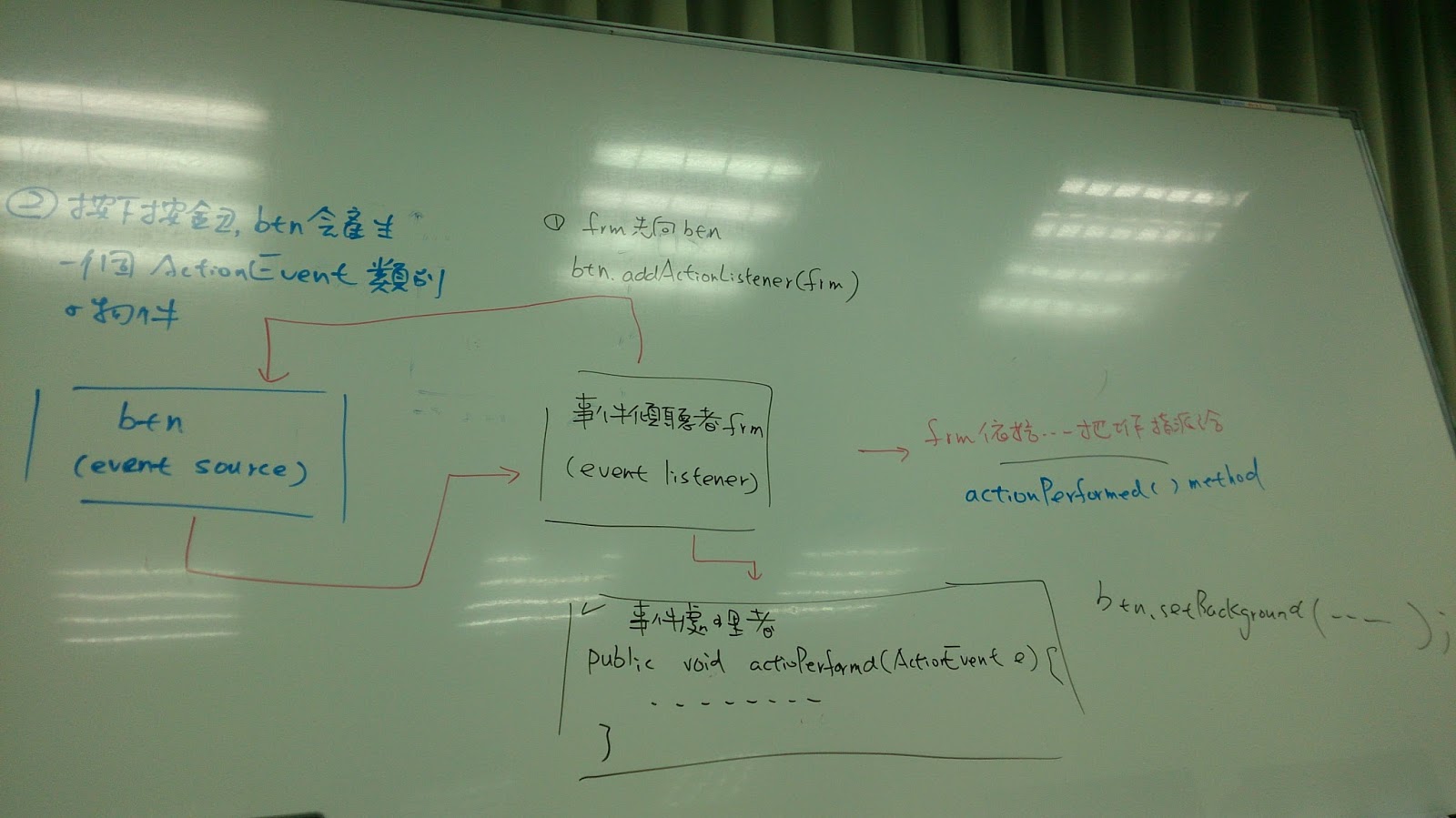
監聽事件 (event listener) 架構圖:


2015年10月7日 星期三

JAVA SL-275_10/04

‧List 
作用是收集物件,並以索引益式保留收集的物件順序。
‧ArrayList
在陣列中的排序使用可以得到較快的速度,
如果是需要調整索引順序時,則會有較差的表現。

.LinkedList
在實作 List 介面時,採用了 (Link) 結構。
first > Object > Object > Object
next next next
Node Node Node
如果要指定索引隨機存取物件時,不建議用 LinkedList,其每次存取都會從頭 (first ) 開始,
但若只是調整索引順序,從還是可以使用 LinkedList。
//------------------------------------------------------------------------------------------------
支援佇列操作的 Queue
繼承自 Collection,所以它也具有 Collection 的 add(), remove(), element() 等方法。
一操作失敗時,會拋出例外

Queue 定義了自己的 offer(), poll(), pee,() 等方法。
一操作失敗時會傳回特定值

offer() 用來在佇列後端加入物件
成功→True, 失敗→false

poll() 取出佇列前端物件,若佇列為空則傳回 null.

peek() 取得(但不取出)佇列前端物件,若佇列為空則傳回 null.
//------------------------------------------------------------------------------------------------
想對佇列的前端與尾端進行操作,在前端加入物件與取出物件,在尾端加入與取出物件, Queue 的子介面 Deque 就定義了這類行為。

addFirst(), removeFirst(), getFirst().
addLast(), removeLast(), getLast().
操作失敗時會傳回例外

offerFirst(), pollFirst(), peekFirst().
offerLast(), pollLast(), peekLast().
操作物敗時會傳回特定值
//------------------------------------------------------------------------------------------------
排序收集的物件
java.util.Collection 提供有 sort() 方法,由於必須有索引才能進行排序,
因此 Collection 的 sort() 方法接受 List 實作的物件。

//------------------------------------------------------------------------------------------------


2015年9月20日 星期日

JAVA SL-275_09/20

/*
join
如果 A 執行緒正在運行,流程中允許 B 執行緒加入,等到 B 執行緒執行完畢再繼續 A 執行緒流程就可以使用 join() 方法完成需求,當執行緒使用 join() 加入至另一執行緒時,另一執行緒會等待被加入的執行緒工作完畢然後再續繼它的動作。
*/

//*****************************************************************************
// joinDemo.java
public class joinDemo{
public static void main(String args[]){
System.out.println("Main thread 開始…");
Thread threadB = new Thread(){
public void run(){
try{
System.out.println("Thread B 開始…");
for(int i=0;i<5;i++){
Thread.sleep(1000);
System.out.println("Thread S 執行…");
}
System.out.println("Thread B 結束");
}catch(InterruptedException e){
e.printStackTrace();
}
}
};
threadB.start();
try{
//Thread B 加入 Main Thread 流程
threadB.join();
}catch(InterruptedException ex){
ex.printStackTrace();
}
System.out.println("Main Thread 將結束…");
}
}
//*****************************************************************************
/*
Thread Group
每個執行緒都屬於某個執行緒群組,可以使用以下程式片段取得目前執行緒所屬的執行緒群組。
Thread.currentThread().getThreadGroup().getName();
可以自行指定執行緒群組,執行緒一旦加入,即無法更改群組。

java.lang.ThreadGroup 可以管理群組中的執行緒。
*/
//*****************************************************************************
package java_0920;

public class ThreadGroupDemo {
public static void main(String args[]){
ThreadGroup tg1 = new ThreadGroup("tg1");

Thread t1 = new Thread(tg1, new Runnable(){
public void run(){
throw new RuntimeException("t1 測試例外");
}
},"tg1");

t1.setUncaughtExceptionHandler(new Thread.UncaughtExceptionHandler() {

public void uncaughtException(Thread t, Throwable e) {
System.out.printf("%s ... %s%n", t.getName(), e.getMessage());
}
});

Thread t2 = new Thread(tg1, new Runnable(){
public void run(){
throw new RuntimeException("t2 測試例外");
}
},"tg2");

t1.start();
t2.start();
}
}
//*****************************************************************************
// 兩執行緒同時間點別相同的方法,會出現競速狀態出現 Error
// 下例的 Error: Exception in thread "Thread-0" java.lang.ArrayIndexOutOfBoundsException
// java.lang.OutOfMemoryError 先不管它,此處為了探討競速物件。

import java.util.Arrays;

public class ArrayList {
private Object[] list;
private int next;
public ArrayList(int capacity){
list = new Object[capacity];
}
public ArrayList(){
this(16);
}

public void add(Object o){
//System.out.println("add start...");
if(next == list.length){
list = Arrays.copyOf(list, list.length * 2);
}
list[next++]=o;
}
public Object get(int index){
return list[index];
}
public int size(){
return next;
}
public static void main(String args[]){
ArrayList list = new ArrayList();
Thread t1 = new Thread(){
public void run(){
while(true){
list.add(1);
}
}
};
Thread t2 = new Thread(){
public void run(){
while(true){
list.add(2);
}
}
};
t1.start();
t2.start();
}
}
//-----------------------------------------------------------------------------------------------
// 同上範例,加入 synchronized 除掉競速問題
// 同樣會有  java.lang.OutOfMemoryError 此處不管它

import java.util.Arrays;

public class ArrayList {
private Object[] list;
private int next;
public ArrayList(int capacity){
list = new Object[capacity];
}
public ArrayList(){
this(16);
}
synchronized public void add(Object o){
if(next == list.length){
list = Arrays.copyOf(list, list.length * 2);
}
list[next++]=o;
}
public Object get(int index){
return list[index];
}
public int size(){
return next;
}
public static void main(String args[]){
ArrayList list = new ArrayList();

Thread t1 = new Thread(){
public void run(){
while(true){
synchronized(list){
list.add(1);
System.out.println(list.get(list.size()-1));
}
}
}
};
Thread t2 = new Thread(){
public void run(){
while(true){
synchronized(list){
System.out.println(list.get(list.size()-1));
list.add(2);
}
}
}
};
t1.start();
t2.start();
}
}
//*****************************************************************************

/*
synchronized 與 volatile
在 Java 中對資可見性的要求,可以使用 volatile 達到,在變數上宣告,表示變數是不穩定的是易變的,也就是可能在多執行緒下存取,可保證變數的可見性,也是是若執行緒變動了變數值,另一執行緒一可以看到變更。
不允許執行緒快取,變數的存取是在共享記憶體中進行。
*/


//*****************************************************************************

// 寫一個練習,分為四個檔案:
// Producer.java
package java_0920;

public class Producer implements Runnable {
private Clerk clerk;
public Producer(Clerk clerk){
this.clerk = clerk;
}
public void run(){
System.out.println("生產者開始生產…");
for(int product=1;product<=10;product++){
try{
Thread.sleep((int)(Math.random()*3000));
}catch(InterruptedException ex){
throw new RuntimeException(ex);
}
clerk.setProduct(product);
}
}
}

//Consumer.java
package java_0920;

public class Consumer implements Runnable {
private Clerk clerk;
public Consumer(Clerk clerk){
this.clerk = clerk;
}
public void run(){
System.out.println("消費者開始消費…");
for(int i=1;i<=10;i++){
try{
Thread.sleep((int)(Math.random()*3000));
}catch(InterruptedException ex){
throw new RuntimeException(ex);
}
int product = clerk.getProduct();
}
}
}

//Clerk.java
package java_0920;

public class Clerk {
private int product = -1 ;

public synchronized int getProduct() {
while(this.product != -1){
try{
wait();
}catch(InterruptedException e){
throw new RuntimeException(e);
}
}
int p = this.product;
System.out.printf("消費者取得…(%d)%n",this.product);
this.product=-1;
notify();
return p;
}

public synchronized void setProduct(int product) {
while(this.product != -1){
try{
wait();
}catch(InterruptedException e){
throw new RuntimeException(e);
}
}
this.product = product;
System.out.printf("生產者設定…(%d)%n", this.product);
notify();
}

}

//ProducerConsumerDemo.java
package java_0920;

public class ProducerConsumerDemo {
public static void main(String args[]){
Clerk clerk = new Clerk();
new Thread(new Producer(clerk)).start();
new Thread(new Consumer(clerk)).start();
}
}
//*****************************************************************************

/*
Collection 集合架構介面關係圖


※可動態產生集合元素
可置入不同型別的資料,依照各集合的特性有:排序性、順序性、不允許重複、是否有鍵值的使用。

<String, Integer> 泛型

public interface Set implements Collection
其特性是無順序性,並且元素與元素之間不得重複。
其利用 equal() 方法來判斷加入的物件是否重複,Set 是資料具唯一性但無順序性的集。

※ 不是用 equals (用於比較字串)
*/
//*****************************************************************************
//HashSet
//沒有順序性 (擺放位置是根據 hashCode) 不允許重複

import java.util.*;

public class HashSetDemo {
public static void main(String argsp[]){
HashSet<String> s = new HashSet<String>();
s.add("SCJP");
s.add("SCWCD");
s.add("SCBCD");

Iterator i = s.iterator();
while(i.hasNext()){
String str = (String)i.next();
System.out.println(str + " ");
}
}
}
//*****************************************************************************
//練習:重複輸入的資料只顯示一個

import java.util.*;

public class HashSetDemo2 {
public static void main(String args[]){
Set<String> words = new HashSet<String>();
Scanner scanner = new Scanner(System.in);
System.out.println("Input english word:");
String line = scanner.nextLine();
String tokens[] = line.split(" ");
for(String token:tokens){
words.add(token);
}

System.out.printf("不重複的單字有(%d)個 %s%n", words.size(), words);

}
}
//執行後自己手動輸入單字,以空白隔開,會自動過濾並顯示出不重複單字。
//*****************************************************************************

import java.util.*;

class Student {
private String name;
private String number;
Student(String name, String number){
this.name=name;
this.number=number;
}
public String toString(){
return String.format("(%s %s)", name, number);
}
}

public class StudentDemo{
public static void main(String args[]){
/*
Set<String> set = new HashSet<String>();
set.add(new Student("Justin", "B6789").toString());
set.add(new Student("Monica", "B8765").toString());
set.add(new Student("Joe", "B213678").toString());
*/
Set set = new HashSet();
set.add(new Student("Monica", "B8765"));
set.add(new Student("Justin", "B6789"));
set.add(new Student("Joe", "B213678"));


System.out.println(set);
}
}


2015年9月13日 星期日

JAVA SL-275_0913

/*
‧使用 finally
無論 try 區塊中有無發生例外,若撰寫有 finally 區塊,則 finally 區塊一定會執行,如果程式撰寫的流程中先 return 了,而且也有寫 finally 區塊,那 finally 區塊會先執行完後,再將值傳回。

try{
do something…
}catch{
do something…
}finally{ // Always 會執行,且優先過 try-cache
….
}

可以允許的程式寫法:
try-cache
try-finally
try-cache-finally

錯誤的寫法:
catch finally
*/
/******************************************************************************/
public class FinallyDemo{
public static int test(boolean flag){
try{
if(flag){
return 1;
}
}finally{
System.out.println("finally...");
}
return 0;
}
public static void main(String args[]){
System.out.println(test(true));
}
}
/******************************************************************************/

/*
java.lang.AutoCloseable 介面
JDK 7 新增了自動關閉資源語法可用的套件,必須實作 java.lang.AutoCloseable 介面,其僅定義了 close() 方法
package java.lang.*;

public interface AutoCloseable{
void close() throws Exception;
}
*/

/*
執行序流程圖

---

執行序的執行狀態:
起始狀態
Thread t = new Thread();

可執行狀態
Thread t = new Thread();
t.start(); t.yield();

執行狀態
實作 Runnable 介面
繼承 Thread 類別
public void run(){
……
}

非可執行狀態
Thread t - new Thread();
sleep().wait().suspend();

結束狀態
stop()
正常結束

*/
/******************************************************************************/
// Thread

public class ThreadDemo{
public static void main(String args[]){
System.out.println("Hello Java 測試");
String str = Thread.currentThread().getName();
System.out.println("Thread name: " + str);
System.out.println(Thread.activeCount());
}
}

/******************************************************************************/
// 練習 Thread 寫龜兔賽跑
// TortoisHareDemo.java

public class TortoisHareDemo{
public static void main(String args [])throws InterruptedException{
boolean flags[]={true,false};
int totalStep=10;
int tortoiseStep=0;
int hareStep=0;
System.out.println("龜兔賽跑開始…");
while(tortoiseStep < totalStep && hareStep <totalStep){
Thread.sleep(1000);
tortoiseStep++;
System.out.printf("烏龜跑了 %d 步…%n", tortoiseStep);
boolean isHareSleep=flags[((int)(Math.random()*10))%2];
if(isHareSleep){
System.out.println("兔子睡著了…zzz");
}else{
hareStep+=2;
System.out.printf("兔子跑了 %d 步…%n", hareStep);
}
}
}
}
/******************************************************************************/
// 練習 Thread 寫龜兔賽跑,拆開來寫成三個檔案:
// Hare.java

public class Hare implements Runnable{
private boolean[] flags = {true,false};
private int totalStep;
private int step;
public Hare(int totalStep){
this.totalStep=totalStep;
}
public void run(){
try{
while(step<totalStep){
Thread.sleep(1000);
boolean isHareSleep = flags[((int)(Math.random()*10))%2];
if(isHareSleep){
System.out.println("兔子睡著了...");
}
else{
step +=2;
System.out.printf("兔子跑了 %d 步…%n", step);
}
}
}catch(InterruptedException ex){
throw new RuntimeException(ex);
}
}
}
//------------------------------------------------------------------------------------
//Tortoise.java

public class Tortoise implements Runnable{
private int totalStep;
private int step;
public Tortoise(int totalStep){
this.totalStep=totalStep;
}
public void run(){
try{
while(step<totalStep){
Thread.sleep(1000);
step++;
System.out.printf("烏龜跑了 %d 步 %n", step);
}
}catch(InterruptedException ex){
throw new RuntimeException(ex);
}
}
}
//------------------------------------------------------------------------------------
//TortoiseHareRace.java

public class TortoiseHareRace{
public static void main(String args[]){
Tortoise t = new Tortoise(10);
Hare h = new Hare(10);
Thread tortoiseThread = new Thread(t);
Thread hareThread = new Thread(h);
tortoiseThread.start();
hareThread.start();
}
}
/******************************************************************************/
// 實作 Thread 類別

class HelloThread extends Thread{
HelloThread(String str){
super(str);
}
public void run(){
for(int i=0;i<1000;i++){
String s = Thread.currentThread().getName();
System.out.println(s +" : " + i);
}
}
}
public class TestThread{
public static void main(String args[]){
HelloThread h =new HelloThread("Monic");
h.start();
}
}

/*
實作 Runnable 介面,好處是有彈性,還有機會繼承其它類別
 繼承 Thread 類別,通常是為了直接利用 Thread 類別中的一些方法才會直接繼承 Thread 類別
*/
/******************************************************************************/
/*
執行序有其優先權,可用 Thread 類別底下的 setPriority() 方法設定優先權,可設定值為 1~10,預設是 5 如果超出 1~10 以外的設定值會拋出 IllegalArgnmentException,數字越大優先權愈高,越優先排入;cpu 若相同,則輪流執行。
*/

// PersonDemo.java
class Person extends Thread{
Person(String str){
super(str);
}
public void run(){
String name=Thread.currentThread().getName();
int priority = Thread.currentThread().getPriority();
Thread.State state = Thread.currentThread().getState();
System.out.println( name + "優先序─ " + priority + ",狀態─ " + state);
for(int i=1;i<=10;i++){
System.out.println(name + "跑完第" + i + "圈");
if(name.equals("Ken") && i%3==0 ){
System.out.println(name + "休息 1 秒…");
}
try{
Thread.sleep(1000);
}catch(InterruptedException ex){
ex.printStackTrace();
}
}
}
}
public class PersonDemo{
public static void main(String args[]){
Person p1 = new Person("Ron");
Person p2 = new Person("Ken");
p1.start();
p2.start();
System.out.println("正在執行的執行序:" + Thread.activeCount());
}
}


/******************************************************************************/
/*
有幾種狀況會讓執行序進入 Blocked 狀態:
呼叫 Thread.sleep() 方法
進入 synchronized 前競爭物件鎖定的阻斷
呼叫 wait() 的阻斷
等待 input/output 完成

一個進入 Blocked 狀態的執行序可由另一個執行序呼叫該執行序的 interrupt() 方法,讓它離開 Blocked 狀態。
*/
/******************************************************************************/
// 比較 synchronized  同步

// 無同步
class Company{
static int sum=0;
static void add(int n){
int tmp=sum;
tmp+=n;
try{
Thread.sleep(1000);
}catch(InterruptedException e){}
sum=tmp;
String name=Thread.currentThread().getName();
System.out.println("執行緒:" + name + ",存款為:" + sum);
}
}
class Ccompany extends Thread{
Ccompany(String str){
super(str);
}
public void run(){
for(int i=1;i<=3;i++)
Company.add(100);
}
}

public class SynchronizedDemo{
public static void main(String args[]){
Ccompany c1 = new Ccompany("Ron");
Ccompany c2 = new Ccompany("Ken");
c1.start();
c2.start();
}
}
/*
輸出結果:
*/
//----------------------------------------------------------------------------
// 加入同步
class Company{
static int sum=0;
synchronized static void add(int n){
int tmp=sum;
tmp+=n;
try{
Thread.sleep(1000);
}catch(InterruptedException e){}
sum=tmp;
String name=Thread.currentThread().getName();
System.out.println("執行緒:" + name + ",存款為:" + sum);
}
}
class Ccompany extends Thread{
Ccompany(String str){
super(str);
}
public void run(){
for(int i=1;i<=3;i++)
Company.add(100);
}
}

public class SynchronizedDemo{
public static void main(String args[]){
Ccompany c1 = new Ccompany("Ron");
Ccompany c2 = new Ccompany("Ken");
c1.start();
c2.start();
}
}

/*
輸出結果:
*/
/******************************************************************************/
//wait

class Company{
static int sale = 0;
synchronized static void add(int n){
String name = Thread.currentThread().getName();
int sum = sale;
sum = sum + n;
System.out.println(name + "銷售量" + n + ",公司銷售量:" + sum);
sale=sum;
}
}
class Ccompany extends Company implements Runnable{
private String id;
public Ccompany(String id){
this.id=id;
}
public void run(){
for(int i=1;i<=10;i++){
Company.add(i);
if(sale > 5){
System.out.println("庫存量超過 5,停止生產…");
try{
wait();
}catch(InterruptedException e){
System.out.println("繼續生產...");
}
}
}
}
}

public class WaitDemo{
public static void main(String args[]){
Thread s1 = new Thread(new Ccompany("S 分店"),"C 分店");
Thread s2 = new Thread(new Ccompany("S2 分店"),"C2 分店");
s1.start();
s2.start();
//s2.interrupt();
}
}


2015年9月7日 星期一

JAVA SL-275_09/06

/*
‧匿名內部類別:簡單的說就是沒有宣告名稱的類別,直接以 {....} 來實作的類別程式碼。
*/

// 利用匿名內部類別來實作 interface
// Anomouse.java

interface Pet{
        String attr="aute";
        void skill();
        void move();
}

public class Anomouse{
        public static void main(String args[]){
                Pet p = new Pet(){              //無 ;
                        public void skill(){
                                System.out.println("拎拖鞋");
                        }
                        public void move(){
                                System.out.println("移動");
                        }
                };
                p.skill();
                p.move();
        }
}

/*
其中,編譯完後,會出現 Anomouse$1.class 匿名內部類別,其內容包含:
 Pet p = new Pet(){              //無 ;
                        public void skill(){
                                System.out.println("拎拖鞋");
                        }
                        public void move(){
                                System.out.println("移動");
                        }
                };
若有 n 個內部類別則會以 $流水號 來依序往後排。
*/
/******************************************************************************/
/*
‧靜態內部類別:是在宣告時加上 static ,使其物件實體配置在記憶體 Global 區塊中。
*/

class MyOuter{
        static class MyStatic{
                public void fooA(){
                        System.out.println("Hello" + "no static");
                }
                public static void fooB(){
                        System.out.println("Hello" + "static method");
                }
        }
}

public class StaticInnerClass{
        public static void main(String args[]){
                MyOuter.MyStatic f = new MyOuter.MyStatic();
                f.fooB();
                f.fooA();
                MyOuter.MyStatic.fooB(); //配置為 static 才可以直接執行!
        }
}
/******************************************************************************/
class MyOuter{
        private int x = 7;
        static private int sx = 9;
        static class MyStatic{
                private int x = 77;
                static private int sx = 99;
                public void fooA(){
                        System.out.println("fooA non-static");
                        System.out.println(sx);
                        System.out.println(MyOuter.sx);
                        System.out.println(x);
                        System.out.println(new MyOuter().x);
                }
                public static void fooB(){
                        System.out.println("fooB static method");
                        System.out.println(sx);
                        System.out.println(MyOuter.sx);
                }
        }
}
public class StaticInnerClass2{
        public static void main(String args[]){
        MyOuter.MyStatic f = new MyOuter.MyStatic();
        f.fooA();
        MyOuter.MyStatic.fooB();
        }
}
/******************************************************************************/
/*
‧try-catch
‧Bug 的分類:
程式語法上的錯誤。
執行時期的錯誤
ex:陣列元素索引值超出最大範圍 or 整數除以 0
邏輯的錯誤。
try{
// do something…
}catch(Exception e){
// do something…(通常在這做堆疊追蹤)
}

Java 中用依處理錯誤的類別:Throwable, Error, Exception

Error → 指的是系統本身發出的錯誤訊息,也有可能是程式所造成。
Exception → 是一個不正常的程式在執行時期所觸發的事件。
Throwable → 為 Error, Exception 的父類別,若其無法處理,則再往上丟給 JVM 處理。
JVM → Throwable → Error
         ↘ Exception

try
撰寫時可將容易發生錯誤的程式碼 package 在 try 中。
catch
產生錯誤事件時,catch 進行攔截,並執行此區塊內程式碼。
*/
/*
※Exception 大多放在 Input/Ouput 位置,若一開始不知道要放什麼類型的 exception,
則可以先讓程式去 run,看它出現什麼錯誤訊息。
以下為例:
public class Test{
        public static void main(String args[]){
                int arr[] = new int[5];
                arr[10] = 7;
                System.out.println("end of main method");
        }
}
故意讓它 run 出錯誤訊息,再加到 try-catch 中:
Exception in thread "main" java.lang.ArrayIndexOutOfBoundsException: 10
        at Test.main(Test.java:4)
/*
public class Test{
        public static void main(String args[]){
                try{
                int arr[] = new int[5];
                arr[10] = 7;
                }catch(ArrayIndexOutOfBoundsException e){
                        System.out.println("catch to Exception");
                        System.out.println("Exception:" + e);
                        System.out.println("e.Message:" + e.getMessage());
                }
                System.out.println("end of main method");
        }
}
/******************************************************************************/
// Average.java
import java.util.*;

public class Average{
        public static void main(String args[]){
                Scanner scanner = new Scanner(System.in);
                double sum = 0 ;
                int count = 0;
                int number = 0 ;
                System.out.println("Key Integer Num. (exit:0):");
                while(true){
                        try{
                                number = scanner.nextInt();
                                if(number == 0 ){
                                        break;
                                }
                                sum += number ;
                                count++;
                        }catch(InputMismatchException e){
                                System.out.println("Error:Input is Integer.");
                                System.out.println("Exception Message:" + e);
                                break;
                        }
                }
                System.out.printf("平均:%.2f%n", sum/count);
        }
}
/******************************************************************************/
//例外繼承架構:
try{
do something…
}catch(IOException e ){ //直系子類別
e.printStackTrace();
}catch(InterruptedException e){
e.printStackTrace();
}catch(ClassCastException e){ //直系父類別
e.printStackTrace();
}
/******************************************************************************/
// Java 7.0 之後 → 多重捕捉 multi-catch
try{
do something…
}catch(IOException | InterruptedException | ClassCastExeption e){
e.printStackTrace(); //堆疊追蹤
}
※左邊的例外不得是右邊的父類別!
/******************************************************************************/
/*
‧利用 throw 丟出例外
throw 用來呼叫或傳遞一個例外,所以可以利用它在程式中觸發一個例外
*/
throw 例外物件變數
→丟出一個例外物件變數
throw new Exception(錯誤訊息字串)
→丟出一個匿名的例外物件
/******************************************************************************/
// FileUtil.java
import java.io.*;
import java.util.*;

public class FileUtil{
        public static String readFile(String name)
        throws FileNotFoundException{
                StringBuilder builder = new StringBuilder();
                try{
                        Scanner scanner = new Scanner(new FileInputStream(name));
                        String text = null;
                        while(scanner.hasNext()){
                                builder.append(scanner.nextLine());
                                builder.append('\n');
                        }
                }catch(FileNotFoundException ex){
                        ex.printStackTrace();
                        throw ex;
                }
                return builder.toString();
        }
}
//---------------------------------------------------------------------
// Demo.java
import java.io.*;

public class Demo{
        public static void main(String args[])
        throws Exception{               // 宣告方法中拋出例外
                System.out.println(FileUtil.readFile("C:\\java\\0906\\Main.java"));
        }
        public static void doSome(String arg)
        throws FileNotFoundException, EOFException{
                try{
                        if("one".equals(arg)){
                                throw new FileNotFoundException();
                        }else{
                                throw new EOFException();
                        }
                }catch(IOException ex){
                        ex.printStackTrace();
                        throw ex;       // 執行時拋出例外
                }
        }
}
//---------------------------------------------------------------------
// 自訂路徑(要同 Demo.java 截取檔案路徑),
隨便編寫內容。 例: C:\java\0906\Main.java
Lccnet
/******************************************************************************/
/*
編譯出 .jar 執行檔
*/
以 eclipse 軟體
File > New > Java Project > TEST
“TEST/src” 右鍵 > New > Class > Main3 (勾選 public static void….)
import javax.swing.*;

public class Main3 {

public static void main(String[] args) {
String s = JOptionPane.showInputDialog("Input number");
JOptionPane.showMessageDialog(null, s);
}

}
對 “TEST” 右鍵 > Export > Java > Runnable JAR file

以指令 jar
編寫檔案 Main3.java ,內容同上。
編譯出 Class檔:javac Main3.java
jar cfe myJRE.jre Main3 Main3.class
/******************************************************************************/
// 堆疊處理
// Main.java

public class Main {

public static String a(){
String text =null;
return text.toUpperCase();
}
public static void b(){
a();
}
public static void c(){
try{
b();
}catch(NullPointerException e){
e.printStackTrace();
Throwable t = e.fillInStackTrace();
throw(NullPointerException) t;
}
}
public static void main(String[] args) {
try{
c();
}catch(NullPointerException ex){
ex.printStackTrace();
}
}
}
/******************************************************************************/
/*
‧ Assert 斷言

assert boolean_expression;
assert boolean_expression:detail_expression;

boolean_expression 若為 true 則什麼事都不會發生;
若為 false 則會發生 java.lang.AssertionError;
*/
//----------------------------------------------------------------------------
// AssertDemo.java

public class AssertDemo{
        final int ACTION_STOP=0;
        final int ACTION_RIGHT=1;
        final int ACTION_LEFT=2;
        final int ACTION_UP=3;

        public static void main(String args[]){
                new AssertDemo().play(0);
                new AssertDemo().play(1);
                new AssertDemo().play(2);
                new AssertDemo().play(3);
//              new AssertDemo().play(5);
                new AssertDemo().testScore(0);
                new AssertDemo().testScore(100);
                new AssertDemo().testScore(-1);
        }

        public void testScore(int score){
                assert(score >= 0 && score <= 100):"成績錯誤";
                System.out.println("score = " + score);
        }

        public void play(int action){
                switch(action){
                case ACTION_STOP:
                        System.out.println("停止撥放");
                        break;
                case ACTION_RIGHT:
                        System.out.println("向右撥放");
                        break;
                case ACTION_LEFT:
                        System.out.println("向左撥放");
                        break;
                case ACTION_UP:
                        System.out.println("向上撥放");
                        break;
                default:
                        assert false : "非定義的常數";
                }
        }
}

/*
※注意,編譯完執行要加 -ea 參數啟用 Assertion
javac AssertDemo.java
java -ea AssertDemo
*/


/******************************************************************************/

JAVA SL-110_08/23

// InterfaceMember.java

interface Surfacing{
        double pi=3.14159;
        double area();
}

class Shap{
        protected double x, y;
        Shap(double x, double y){
                this.x = x;
                this.y = y;
        }

        public String toString(){
                return "圖形原點:("+ x +", " + y + ")";
        }
}

class Ccircle extends Shap implements Surfacing{
        private double r;
        public Ccircle(double x, double y, double r){
                super(x,y);
                this.r = r;
        }

        public double area(){
                return pi * r * r;
        }

        public String toString(){
                return "圓心:(" + x + "," + y + "),半徑:" + r + ",面積:" + area();
        }
}

public class InterfaceMember{
        public static void main(String args[]){
        Ccircle c = new Ccircle(3, 5, 6);
        System.out.println(c.toString());
        System.out.println("圓周率:" + c.pi);
        System.out.println("圓周率:" + Surfacing.pi); // interface不需建立實體也能執行
        }
}

/*******************************************************************************/

姓名中翻英:http://c2e.ezbox.idv.tw/name.php
Kai-Lin Liao

地址中翻英:http://www.post.gov.tw/post/internet/SearchZone/index.jsp?ID=130112
7F., No.6, Ln. 75, Zhonghua Rd., Sanxia Dist., New Taipei City 237, Taiwan (R.O.C.)

VUE 辦帳號:http://www.vue.com/oracle/
Oracle 辦帳號:https://login.oracle.com/mysso/signon.jsp

/*******************************************************************************/
.抽象類別:
是為了讓方法的使用更多樣化,若父類別是一個抽象類別,
其所產生的抽象方法都必須由子類別來加以實作,
如果沒有全部實作則子類別也要宣告成抽象類別。

abstract class 類別名稱

抽象方法的宣告(不可以是 static)

abstract 傳回值 方法名稱(參數列);

存取權限不可以是 private,沒有抽象建構子和屬性。

.如何實作抽象類別
利用 extends 關鍵字
子類別透過 override 父類別的方法
/*******************************************************************************/
.介面
只能有無實作的方法
void show();

.抽象類別
可以有一般的方法和抽象方法
abstract void  show();
void show(){System.out.println();};

.一般類別
只能有一般方法
void show(){System.out.println();};
/*******************************************************************************/


// LineShow.java

abstract class LineDemo{                // 宣告抽象類別
        private int length;

        LineDemo(int length){
                this.length = length;
        }

        abstract double area();         // 抽象方法

        int getlength(){                // 一般方法
                return length;
        }
}

public class LineShow extends LineDemo{
        LineShow(int length){
                super(length);
        }

        public static void main(String args[]){
                LineShow s = new LineShow(10);
                System.out.println("area = " + s.area());

                // 因為 length 是 private 權限,要印出必須透過 getlength()
                System.out.println("length = " + s.getlength);
        }

        public double area(){                           // 實作 LineDemo 的 area();
                return Math.pow(getlength(),2);         // Math.pow(n, a) -> n^a
        }
}
/*******************************************************************************/
.enum 列舉
列舉就十南一種類別,可以單獨撰寫,也可以在類別內當成內部類別。

存取權限 (static) enum 列舉名稱{
A, B, …..}

列舉的內容值都是經過 public, static, final 的修飾。
列舉的內容一經初始給定後就無法更改。

public enum week{…}
/*******************************************************************************/
//.列舉練習,分兩個檔案來寫:Week.java、WeekEnum.java
/*--------------------------------------------------------------------------------------------------*/
// Week.java

public enum Week{
        Sunday, Monday, Tuesday, Wednesday, Thursday, Friday, Saturday}
/*--------------------------------------------------------------------------------------------------*/
// WeekEnum.java

public class WeekEnum{
        public static void play(Week week){
                switch(week){
                        case Sunday:
                                System.out.println("Sunday");
                                break;
                        case Monday:
                                System.out.println("Monday");
                                break;
                        case Tuesday:
                                System.out.println("Tuesday");
                                break;
                        case Wednesday:
                                System.out.println("Wednesday");
                                break;
                        case Thursday:
                                System.out.println("Thursday");
                                break;
                        case Friday:
                                System.out.println("Friday");
                                break;
                        case Saturday:
                                System.out.println("Saturday");
                                break;
                        default:
                                System.out.println("DEFAULT");
                }
        }

        public static void main(String args[]){
                play(Week.Sunday);
                play(Week.Monday);
        }
}
/*******************************************************************************/


.取得列舉內容的方式
透過-運算子
透過-參照
Week week = new Week();
System.out.println(week.Sunday);

透過 value()
Week[] week2 = Week.values();
for(int i=0; i<week2.length;i++){
System.out.println(week2[i] + “, ”);
// 或
for(Week w:Week Values())
System.out.println(w + “, “);

利用 valueOf(String s)來取得
System.out.println(Week.valueOf(“Sunday”));

/*******************************************************************************/
// 實作練習 Enum 各取得內容方法
// 需要保留前一練習的檔案 Week.java
// WeekEnum2.java

public class WeekEnum2{
        public static void main(String args[]){
                System.out.println("=========方法2:透過參照=========");
                Week week = Week.Sunday;
                System.out.println(week.Sunday);

                System.out.println("=========方法3-1:透過 value() / for 迴圈=========");
                Week[] week2 = Week.values();
                for(int i=0; i<week2.length; i++)
                        System.out.println(week2[i] + ", ");

                System.out.println("=========方法3-2:透過 value() / for-each=========");
                for(Week w:Week.values())
                        System.out.println(w + ", ");

                System.out.println("=======方法4-1:利用 valueOf(String s)來取得=======");
                System.out.println(Week.valueOf("Sunday"));

                System.out.println("=======方法4-2:利用 valueOf(String s)來取得=======");
                System.out.println(Week.valueOf(Week.class, "Sunday"));
        }
}
/*******************************************************************************/

.內部類別 InnerClass
一般內部類別
方法內部類別
匿名內部類別
靜態內部類別

MyOuter$MyInner$MyInnerAgain.class
( $ 代表階層概念 )

class MyOuter{
class MyInner{ //內部類別
class MyinnerAgain{
foo(){} // 次內部類別
}
}
class MyInner2{ //內部類別

}
class MyInner3{ //內部類別

}
}
/*******************************************************************************/
// 練習 InnerClass:MyOuterDemo.java
class MyOuter{
        class MyInner{
                public void foo(){
                        System.out.println("MyInner foo()");
                }
        }
}
public class MyOuterDemo{
        public static void main(String args[]){
                System.out.println("===== 方法一 ========");
                MyOuter t = new MyOuter();
                MyOuter.MyInner t1 = t.new MyInner();
                t1.foo();

                System.out.println("===== 方法二 ========");
                MyOuter.MyInner t3 = new MyOuter().new MyInner();
                t3.foo();

                System.out.println("===== 方法三 ========");
                new MyOuter().new MyInner().foo();
        }
}
/*******************************************************************************/
// InnerClassDemo.java

class MyOuter{
        private static int sx=9;
        private int x=7;

        class MyInner{
                private int x=77;
                public void foo(){
                        int x=777;
                        System.out.println("Local x =" + x);
//無法印出        //System.out.println("MyInner x=" + MyInner().x);
                        System.out.println("MyInner x =" + this.x);
                        System.out.println("MyOuter x =" + MyOuter.this.x);
//無法印出        //System.out.println("MyOuter x=" + MyOuter.x);
                        System.out.println("MyOuter sx =" + sx);
                        System.out.println("MyOuter sx =" + MyOuter.sx);

                }
        }
}

public class InnerClassDemo{
        public static void main(String args[]){
                new MyOuter().new MyInner().foo();
        }
}
/*******************************************************************************/
// CboxDemo.java

class Cbox{
        private int height, width, length;
        private Color cr;

        Cbox(int height, int width, int length, String str){
                this.height = height;
                this.width = width;
                this.length = length;
                cr = new Color(str);
        }

        void show(){
                System.out.println("area = " + height*width*length);
                cr.show_color();
        }

        class Color{                    // innerclass
                private String color;

                Color(String color){
                        this.color=color;
                }

                void show_color(){
                        System.out.println("color = " + color);
                }
        }
}

public class CboxDemo{
        public static void main(String args[]){
                Cbox b = new Cbox(3,5,8,"blue");
                b.show();
        }
}
/*******************************************************************************/
/* 練習 InnerClass 技巧,並印出:
STUST公司員工資料
-------------------------
姓名:KLin
-------------------------
地址:Taiwan
-------------------------
行動電話:0912345678
-------------------------
電話號碼:06543210
*/
// ShowInner.java

class businessCard{
        private company c;
        private employee e;

        businessCard(String company, String name, String address, String mobile, String tel){
                c = new company(company);
                e = new employee(name, address, mobile, tel);
        }

        void show(){
                c.show_company();
                e.show_employee();
        }

        void separator(){
                System.out.println("-------------------------");
        }

        class employee{
                private String name, address, mobile, tel;
                employee(String n, String a, String m, String t){
                        name=n;
                        address=a;
                        mobile=m;
                        tel=t;
                }
                void show_employee(){
                        System.out.println("姓名:"+name);
                        separator();
                        System.out.println("地址:"+address);
                        separator();
                        System.out.println("行動電話:"+mobile);
                        separator();
                        System.out.println("電話號碼:"+tel);

                }
        }

        class company{
                private String myCompany;
                company(String myCompany){
                        this.myCompany = myCompany;
                }
                void show_company(){
                        System.out.println(myCompany + "公司員工資料");
                        separator();
                }
        }
}

public class ShowInner{
        public static void main(String arga[]){
                new businessCard("STUST", "KLin", "Taiwan","0912345678", "06543210").show();
        }
}
/*******************************************************************************/

.方法內部類別:在方法中宣告的類別。
/*******************************************************************************/
// MethodInnerClass.java

public class MethodInnerClass{
        public static void main(String args[]){
                new MethodInnerClass().see();
        }
        void see(){
                class MyInner{
                        void foo(){
                                System.out.println("MethodInnerClass foo");
                        }
                }
                MyInner mi = new MyInner(); // 注意必須建立 MyInner 實體
                mi.foo(); // 才能印出 foo()
        }
}